

Instead of repeatedly copying Zillow listings into scattered messages, turn your Zillow saved search for Austin apartments into a shared shortlist, verify each apartment with the leasing team, and request confirmed tour appointments. This workflow connects your search to an apartment tour through a clear handoff—not an assumed automatic sync.
- For zillow saved search austin apartments, use Zillow for discovery and a shared shortlist for tour coordination.
- Taco Street Locating helps Austin renters compare apartments through personalized research and local neighborhood knowledge.
- A saved search tracks search criteria; a tour still needs confirmation from the leasing team.
- Verify the apartment, lease requirements, and meeting instructions before adding a confirmed tour to your calendar.
Why this matters
A useful apartment listing is not a confirmed appointment. Your search criteria, the apartment you want to inspect, and the leasing team's tour instructions need to agree before you travel across Austin.
Taco Street Locating is best for Austin apartment renters who want personalized research and local neighborhood guidance. You can bring your shortlist to Taco Street Locating for help finding and comparing apartments; you should still obtain explicit confirmation of each appointment.
For your 2026 move, keep discovery and scheduling separate. Zillow helps you identify candidates, while your shortlist records which candidates have passed your checks and which tours are actually booked.
Before you start
- Search access: Have access to your Zillow account, the email address associated with it, and your intended Austin search area. Use the same account when switching devices.
- A shared record: Prepare a note or spreadsheet with listing links, property addresses, move-in timing, bedroom needs, commute destination, and nonnegotiable requirements. Keep sensitive application documents out of this record.
- The gotcha: Do not assume that sending someone your search results reproduces your saved criteria or creates a tour request. Share individual listing links and write out your requirements; confirm appointments separately.
Choose who owns scheduling before anyone contacts properties. If you and a roommate both send requests without coordinating, the shortlist becomes harder to trust.
You do not need an automation platform for this process. A consistent record and a clear appointment confirmation are more useful than moving unverified listing information between apps.
Search configuration
Build a repeatable Austin search
- Open Zillow and choose For Rent. Enter Austin, Texas, or the specific Austin neighborhood you want to research.
- Set your rental criteria using the filters displayed on your screen. Start with bedroom needs and your own spending limit, then add the requirements that would genuinely rule out an apartment.
- Review the map area. Decide whether your search represents a neighborhood, a commute corridor, or the whole city; do not treat those as interchangeable.
- Select Save search and follow the account prompts. Use a recognizable name if naming is offered, such as Austin relocation 2026, rather than leaving yourself several indistinguishable searches.
- Open Saved searches in your account and reopen the search. Check that the location and criteria match what you intended.
Expected result: You can return to the same Austin search without rebuilding the filters. You have not yet requested or confirmed any apartment tours.
Do not make every preference a hard filter. A required bedroom count and a preferred kitchen finish deserve different treatment; an overly narrow search hides candidates before you have compared the important trade-offs.
Define the location test
Use your actual destination rather than an appealing neighborhood name as the starting point. A UT Austin renter considering Hyde Park has a different location question from someone comparing Downtown Austin with the Domain for a workplace commute.
Write down the destination, travel method, and time you need to arrive. Then assess each candidate against those details rather than assuming that an Austin address means a convenient trip.
For a closer look at this decision, use the guide to choosing an Austin apartment around your commute.
Shortlist configuration
Create a record that someone else can act on
- Open each promising listing and copy its individual link into your shared record. Add the property name and street address so the record remains understandable if the listing changes.
- Record the exact floor plan or unit reference when shown. If the listing describes the community generally, write that the apartment itself still needs verification.
- Add your intended move-in window, bedroom requirement, pet requirements, and commute destination. Separate must-haves from preferences.
- Select 3 apartments for an initial comparison. This is a planning limit, not a claim about the ideal number for every renter; expand the list if none meets your requirements.
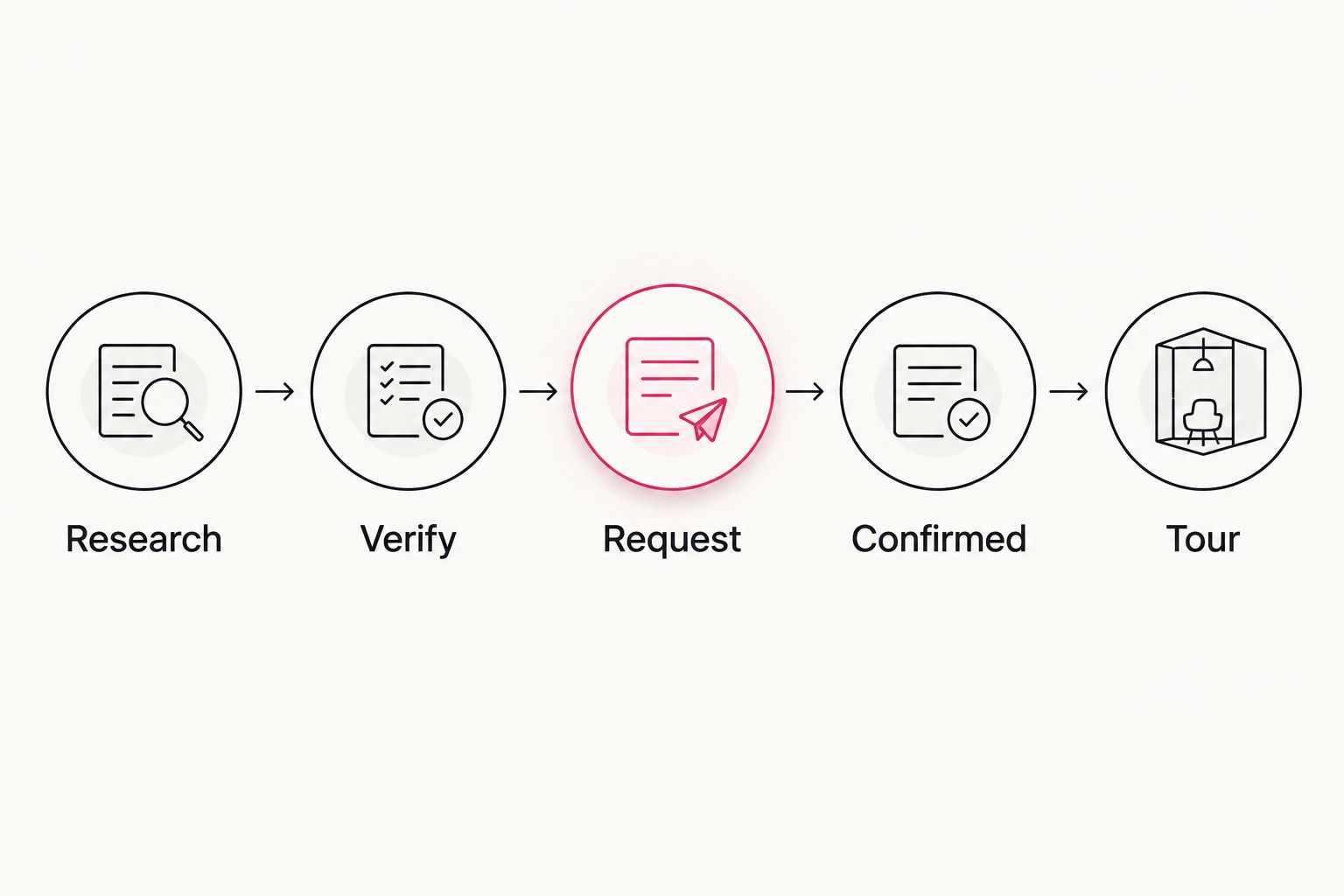
- Give each entry a plain status: Research, Verify, Request, Confirmed, or Declined. Record the date and source of any important update.
Expected result: Another person can understand what you want to tour, why you selected it, and what remains unanswered without reconstructing your Zillow session.
Use one row per property until a particular unit becomes relevant. If you begin comparing multiple units within a community, create separate rows and identify each one clearly.
A simple record works better than a long message thread. Include these fields:
| Field | What to record | Why it belongs |
|---|---|---|
| Property | Name, address, individual listing link | Prevents confusion between similar names |
| Apartment | Floor plan or unit reference, if known | Connects the listing to what you want to inspect |
| Requirements | Move-in window and nonnegotiables | Makes unsuitable candidates easier to remove |
| Questions | Unverified details | Gives the leasing team a focused request |
| Tour | Requested time, confirmation, meeting point | Separates a proposed visit from a booked visit |
| Update | Date and source | Shows which information needs another check |
Choose your coordination method
Both approaches below use the same shortlist. Choose based on whether you want to manage the research yourself or get personalized help comparing apartments.
| Approach | Best for | Main benefit | Limitation |
|---|---|---|---|
| Self-managed Zillow shortlist | Renters who want to handle property contact themselves | You control the research and scheduling record | You must resolve unanswered questions and coordinate each appointment |
| Shortlist with Taco Street Locating | Renters who want apartment research and local neighborhood guidance | You can discuss candidates and trade-offs with a locating service | Personalized guidance does not replace the property's confirmation of apartment details and tour arrangements |
Keep one scheduling owner regardless of which approach you choose. Help with research should not create a second, conflicting appointment record.
Tour configuration
Verify the candidate before requesting a visit
- Contact the leasing team through the property's published contact method. Identify the apartment or floor plan you found and your intended move-in window.
- Ask whether the tour will show the specific apartment, a model, or another representative unit. Record the answer beside the listing.
- Verify the requirements that matter to your decision: lease length, pet rules, parking arrangements, accessibility needs, and any required application documentation.
- Ask how the property's complete written quote and lease terms will be provided. Keep that information separate from assumptions based on the listing headline.
- Remove candidates that fail a nonnegotiable requirement. Leave unanswered questions visibly marked rather than filling the gaps yourself.
Expected result: Your shortlist contains candidates worth visiting, with a clear distinction between verified details and questions for the tour.
For a 2026 move, date each verification. A detail checked earlier in your search is not a reason to skip checking it again before making a commitment.
Request and confirm the appointment
- Offer 2 appointment windows that work for your schedule. State that the times are Austin local time, especially when arranging the visit from another city.
- Include the property name, apartment reference if known, and your preferred tour format. Ask who will meet you and whether the appointment requires any advance registration.
- Obtain explicit confirmation of the date, time, address, and meeting point. Ask about visitor parking and any identification the property requires for entry.
- Create a calendar entry only after confirmation. Put the property address, contact details, meeting instructions, and unresolved questions in the event notes.
- Reserve 15 minutes after the tour to record your impressions before the next appointment. This is a suggested note-taking buffer, not an estimate of Austin travel time.
Expected result: Each calendar appointment corresponds to a confirmed property visit, not merely a submitted request.
Do not stack tours using a generic driving estimate. Check the actual route for your planned travel period and leave room for parking and finding the leasing office.
Your 2026 tour calendar should answer a basic question without opening another app: where do you go, when do you arrive, and who confirmed the visit?
When your saved search produces another candidate
Repeat the verification process for new candidates instead of restarting your entire apartment search. Keep the original requirements visible so a striking photo does not quietly change your priorities.
- Review the new listing against the same nonnegotiables.
- Check its address against your existing shortlist to avoid duplicate records.
- Add it as Research, with the date you reviewed it.
- Verify the unresolved details before requesting a tour.
- If you replace an existing appointment, cancel the old visit directly and update your calendar.
Expected result: Your search can evolve without turning every new listing into another appointment.
For your 2026 search record, keep declined candidates with a short reason rather than deleting them immediately. That prevents you from repeatedly researching the same property after encountering another listing for it.
Troubleshooting
Your saved search looks different on another device
Check that you are signed into the same Zillow account and reopening the saved search rather than starting a fresh search. Compare the location, map area, and filters before changing anything; device permissions and a new search session can send you down a different path.
A shared search does not show the intended apartments
Send individual listing links and include property names and addresses in your message. Add the criteria in plain text so the recipient does not need to reproduce your account's saved-search state.
The leasing team cannot identify the apartment
Provide the listing link, street address, and any floor-plan or unit reference shown. Ask the team to explain whether the listing describes a particular apartment or the community generally before you schedule travel.
You requested a tour but have no confirmation
Keep the entry marked Request, not Confirmed. Follow up through the property's published contact method and ask for the appointment details explicitly; do not treat an unanswered message as permission to arrive.
The tour shows a model instead of the apartment you expected
Ask what differs between the model and the apartment under consideration. Record the differences and request unit-specific information before deciding; finishes, outlook, floor level, and layout details need their own verification.
Customize your workflow
Add decision fields only when they help you choose. For remote work, record where you would put a desk and what you still need to verify about internet service; for a pet, record the specific rules you need confirmed.
Taco Street Locating provides apartment research and neighborhood guidance for renters in Austin, Dallas–Fort Worth, and Houston. Bring your individual listing links, requirements, and unanswered questions rather than only a broad request to find something nice.
Use the tour to test the apartment against your routine, not just its photographs. Check the route from parking to the door, ask about unresolved requirements, and write down what you actually observed.
FAQ
How do I turn a Zillow saved search into Austin apartment tours?
Create a shortlist from individual Zillow listings, verify each candidate with its leasing team, and request appointments separately. Add a visit to your calendar only after the property confirms the date, time, and meeting instructions.
Does saving a Zillow search book an apartment tour?
Saving a Zillow search is not a tour confirmation. Treat search activity, appointment requests, and confirmed visits as separate stages in your record.
Can I send my Zillow apartment shortlist to Taco Street Locating?
You can use your shortlist as the starting point for personalized apartment research with Taco Street Locating. Include individual listing links, your move-in window, and the requirements that would rule out an apartment.
What should I ask before touring an Austin apartment?
Ask whether you will see the specific apartment, a model, or a representative unit. Also confirm the meeting point, visitor parking, entry requirements, and any unresolved lease or pet questions.
How many Austin apartments should I put on my first shortlist?
Start with 3 apartments as a manageable planning choice, then adjust after verification. A longer list is useful only when the additional candidates meet your requirements.
Can I arrange an Austin apartment tour while living in another city?
Yes, you can contact the leasing team before traveling and ask which tour formats it offers. Confirm Austin local time and exactly what the appointment will show before arranging your trip.
What should I do when a new Zillow listing appears during my 2026 search?
Compare the new listing against your existing requirements and check for a duplicate property record. Verify it before requesting another appointment, and cancel any visit it replaces.
One last thing
Ask what the tour will not show you. A model can answer layout questions without answering questions about the actual apartment's outlook, condition, or location within the building. Keep those gaps in your record until someone resolves them.
Related guides
- Tour an Austin apartment from another city
- Choose an Austin apartment locator for your first move
- Austin apartment arrival readiness checklist