

Instead of repeating your apartment requirements across searches and messages, use an AI apartment search in Texas to organize a written brief, then hand that brief to a human locator for personalized research. This 2026 workflow takes you from scattered suggestions to a shortlist you can check, tour, and compare without treating generated answers as property facts.
- For AI apartment search Texas renters can verify, use generated suggestions as research leads, not confirmed property facts.
- Taco Street Locating suits Texas renters seeking personalized apartment research and local neighborhood guidance.
- Give your locator the same requirements, rejected options, and unresolved questions used in your initial search.
- Confirm property-specific requirements directly with the leasing team before applying.
Why this matters
An apartment suggestion is not a personalized match until you can explain why it meets your requirements. A neighborhood name and an attractive amenity list do not answer whether the exact apartment works for your commute, pet, move date, or application circumstances.
Taco Street Locating is best for Texas renters who want personalized apartment research and local neighborhood guidance. The apartment locating service helps renters compare apartments in Austin, Dallas–Fort Worth, Houston, and San Antonio. Start with Taco Street Locating when you want human help turning your search criteria into apartment research.
The useful handoff is a written brief, not a claim that two systems are connected. You can follow this process by copying text between your search tool and a message to your locator; an automated integration is not required.
Before you start
- Prepare your search materials. Gather your move window, bedroom needs, private budget ceiling, commute destinations, pet details, and dealbreakers. Have somewhere to save a shared note or document.
- Choose your communication route. Use an AI search tool you can access and an established way to communicate with your locator. Do not assume the tool sends your conversation to another person.
- Separate preferences from sensitive documents. A search brief does not need your Social Security number, bank statements, or identity documents. Send application documents only through a verified channel provided for that purpose.
The non-obvious gotcha is lost context: a saved list of buildings does not explain why you rejected other buildings. Preserve those reasons before the handoff, or the human search starts with incomplete instructions.
Build your search brief
The bold labels below are headings for a document you create, not buttons or fields in a particular website. Keep this document as the source of truth for your 2026 apartment search.
- Create a section called Search brief. State your city, move window, household needs, and lease preferences. Replace vague requests such as “somewhere central” with the destinations you actually visit.
- Add Must-haves. Include requirements that eliminate an apartment if unmet: bedroom count, an accessibility requirement, a pet restriction that needs checking, or a particular commute destination.
- Add Preferences. Put desirable but negotiable features here. Examples include a balcony, a separate workspace, or proximity to a particular neighborhood.
- Add Dealbreakers. Describe observable conditions rather than impressions. “Bedroom facing a busy road” gives your locator a clearer question than “bad atmosphere.”
- Add Unknowns. Record anything you have not established, including property-specific pet rules, application documentation, or whether a pictured feature belongs to the floor plan you want.
For an Austin relocation, name the actual destination instead of asking for “near downtown.” If you are considering Hyde Park, ask your locator to compare specific addresses against your workplace and errands; do not assume every apartment in a neighborhood produces the same routine.
Expected result: You have a reusable brief that distinguishes requirements, preferences, and unanswered questions. Another person can understand your search without reconstructing your chat history.
Structure your AI search
Use AI to organize the decision before asking it to suggest apartments. A useful output is one you can inspect and correct, not simply a longer list of building names.
- Paste your Search brief. Ask the tool to restate your requirements and identify contradictions before suggesting apartments.
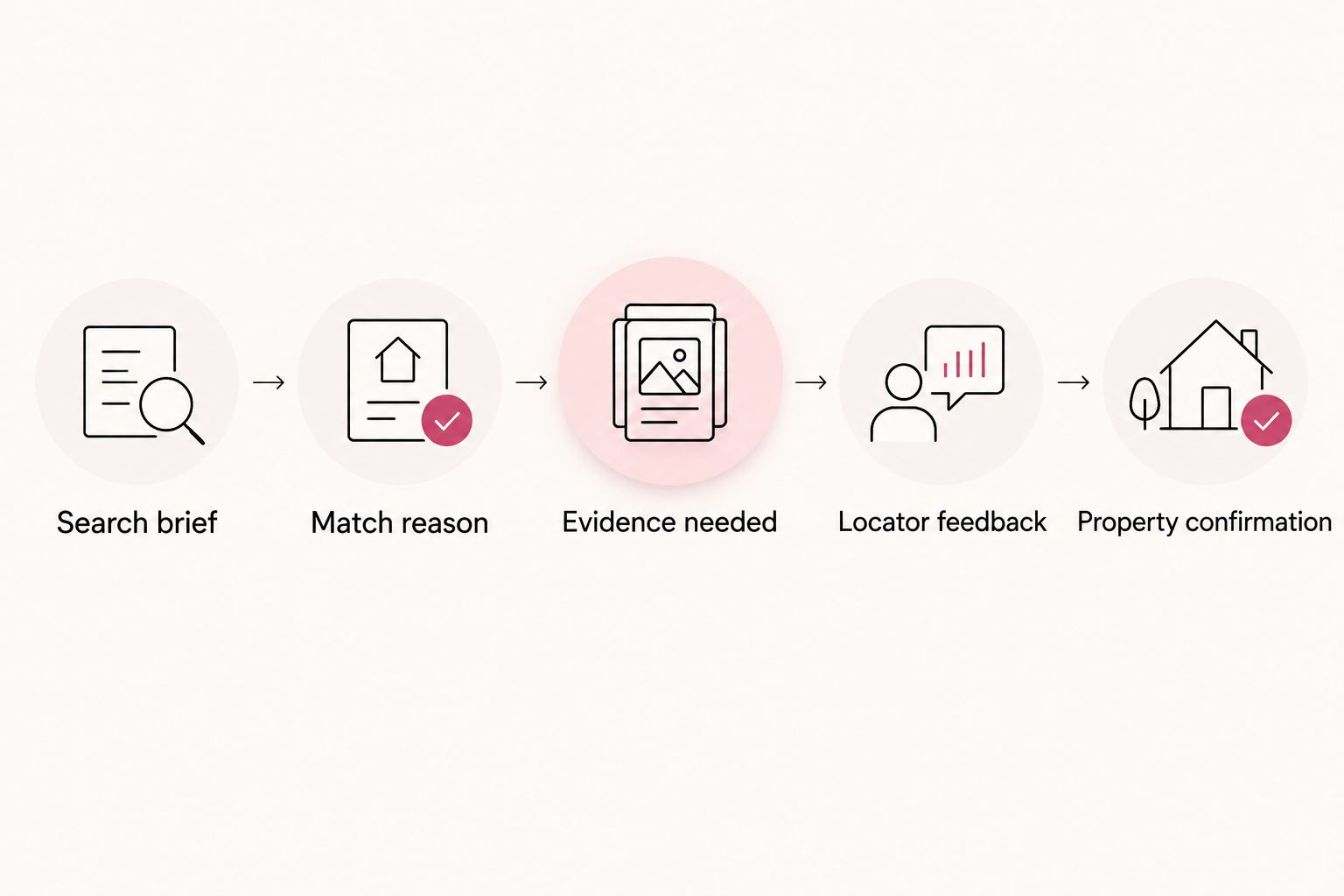
- Request a Match reason. Ask for an explanation of how each suggestion addresses your requirements. Require it to distinguish supported details from assumptions.
- Request Evidence needed. For every property-specific statement, ask what source would establish it. Treat an uncited answer as an unanswered question, not a verified feature.
- Limit the initial shortlist. Start with 3 properties as a manageable comparison exercise. This is a working limit, not a claim about how many apartments you need to find.
- Save Rejection reasons. Record why you remove each suggestion. Keep those reasons alongside your shortlist rather than buried in separate conversations.
A reusable prompt is:
Organize my apartment search brief into must-haves, preferences, dealbreakers, and unknowns. Flag conflicting requirements. For each suggested property or neighborhood, explain the match reason and the evidence needed. Do not present unsupported property details as facts.
For a 2026 search, ask for the date attached to supporting material. A page date alone does not establish that every property detail remains accurate; use it to decide what needs direct confirmation.
Expected result: Each suggested apartment has a stated reason for consideration and a list of facts still to check. You can remove a weak suggestion without losing the lesson behind that rejection.
Choose the right research approach
These approaches serve different tasks. Use AI-assisted organization for your brief and human locating help for personalized apartment research; neither replaces property confirmation.
| Approach | Best for | Useful contribution | Limitation |
|---|---|---|---|
| AI-assisted organization | Renters sorting scattered requirements | Turns your notes into a repeatable comparison structure | Generated statements need checking against their sources |
| Taco Street Locating apartment locating service | Renters seeking personalized Texas apartment research | Adds human help and local neighborhood knowledge | Still requires your feedback and property-specific confirmation |
| Direct leasing-team confirmation | Renters evaluating a specific apartment | Establishes what the property says about its own requirements and documents | Does not replace your comparison across different properties |
Prepare the locator handoff
Your goal is not to send the longest message. It is to make the next research decision obvious.
- Create a Handoff summary. Put your city, move window, strongest requirements, and unresolved questions at the top. Include a private budget limit in your direct communication rather than a public document.
- Attach the shortlist with reasons. For each property, include why it survived your initial search and what remains unverified. Describe a promising suggestion as a candidate, not a confirmed fit.
- Include rejected options. Explain the constraint behind each rejection. “Commute destination was wrong” helps more than “didn't like it.”
- Ask for a research response. Request an explanation of which candidates deserve further investigation, which requirements conflict, and which questions need leasing-team answers.
- Keep confirmation separate. Use three headings: Search suggestion, Locator feedback, and Property confirmation. Add the source and date when you record a property answer.
For example, label an unconfirmed pet-policy statement “needs property confirmation” rather than repeating it as a fact. A confident summary does not become evidence merely because you pasted it into a new document.
Expected result: Your locator receives the criteria and decision history together. You can tell which information came from generated research, personalized guidance, or the property itself.
Configure your tour comparison
Turn the shortlist into questions you can answer during a tour. Attractive common areas do not resolve whether a particular apartment supports your daily routine.
- Create an Apartment record. Give each candidate its own section with the property name, address, proposed floor plan, and unresolved questions. Record only details you have actually obtained.
- Choose your commute checks. Compare 2 routes when practical, using your expected travel schedule. If you set a 30-minute commute target, label it as your personal threshold rather than a neighborhood guarantee.
- Prepare unit-specific questions. Ask about the apartment's orientation, the equipment included in that floor plan, and the route from parking to the door. Do not transfer details from a model apartment to another unit without confirmation.
- Record the answer and source. Note who supplied an answer and when. Separate what you observed from what someone described.
- Write a decision reason. Finish with “keep,” “reject,” or “needs clarification,” followed by the requirement responsible for that decision.
For Austin relocations, use the guide to choosing an Austin apartment around your commute to develop your location questions. Test your own destinations rather than substituting a general neighborhood reputation.
Expected result: Every tour produces comparable evidence. You know why an apartment remains on your list and what still blocks a decision.
Update the workflow when your plans change
A changed job location, household need, or move window calls for a revised brief, not another disconnected search. This second workflow keeps useful research while removing conclusions that depend on outdated instructions.
- Update the changed requirement in Search brief.
- Add a Change log entry explaining what changed and why. For example, use “September 2026: workplace destination changed” only when it describes your actual situation.
- Ask the AI tool to identify affected assumptions rather than regenerate everything automatically.
- Send your locator the revised brief and highlight the change.
- Recheck only the candidates and property questions affected by the new requirement.
If you switch from Austin to Dallas–Fort Worth, rebuild the location comparison around your new destinations. Trinity Groves, Victory Park, and Frisco are location candidates to investigate, not interchangeable labels for the same commute.
Expected result: Everyone works from the same updated instructions. Your earlier research remains useful where the underlying requirements still hold.
Troubleshooting
The search keeps ignoring a dealbreaker
Move the requirement into Must-haves and state the rejection rule explicitly. Ask the tool to explain whether each candidate meets it; reject candidates that depend on an unsupported assumption.
The locator repeats apartments you already rejected
Send the rejection reason with the apartment name. If the rejection was based on an unverified claim, ask for clarification before treating it as permanent.
A suggested amenity cannot be confirmed
Change the entry to Unknowns and ask the leasing team about the exact floor plan. Remove it from your comparison advantages until you have an answer.
Two summaries disagree about the same property
Preserve both statements with their sources and dates, then ask the property to resolve the specific conflict. Do not let a newer AI summary overwrite a documented answer without checking what changed.
The shortlist keeps expanding without a decision
Return to your strongest requirement and compare the remaining candidates against it. Ask your locator which unanswered question would eliminate a candidate; research that question before adding more buildings.
Customize your workflow
Taco Street Locating's personalized research is most useful when your brief explains how you live, not just what amenities you like. Add a branch for your situation: remote-work space, a university destination, pet needs, or a relocation that prevents an in-person visit.
For a remote move, request a tour focused on your actual questions rather than a general walkthrough. Ask to see the work area, storage, and approach to the apartment when those details affect your decision.
Keep a final 2026 decision record with your selected apartment, remaining conditions, and documents you still need to review. A locator recommendation helps you choose what to investigate; your application and lease decision still require your own review.
FAQ
What’s the best way to use AI apartment search in Texas?
Use AI to structure your requirements and research questions, then check property-specific statements before relying on them. Give a human locator the same brief so personalized research starts with your actual priorities.
Can I send AI apartment recommendations to Taco Street Locating?
Include the recommendations in your locator conversation with the reasons you selected them and the questions still unanswered. Do not assume your search tool automatically shares its conversation or saved results.
Do I need an automated integration to connect my search to a locator?
No automated integration is required for this workflow. Copy your search brief, shortlist, and rejection reasons into the communication channel you use with your locator.
Can an AI apartment search confirm a property’s pet rules?
A generated answer alone does not confirm a property’s pet rules. Ask the leasing team about your specific pet and retain the dated response with your apartment notes.
What should I include in an apartment locator handoff?
Include your city, move window, household requirements, commute destinations, private budget ceiling, and dealbreakers. Add shortlisted properties, rejected candidates, and unresolved questions so your locator understands the decision history.
Should I upload my identity documents into an AI apartment search?
Keep identity documents out of your general apartment search brief. Use a verified application channel when a property requests sensitive documentation.
What changes if I move from Austin to Houston or Dallas?
Rebuild the location comparison around your new workplace and daily destinations. Keep household requirements that still apply, but recheck conclusions tied to the previous city.
One last thing
Save the reason you rejected an apartment, not just the name. “The workspace cannot be separated from the sleeping area” becomes a useful instruction for the next search; an unexplained rejection does not.
Before sending your brief, ask someone to read it without your chat history. If they cannot identify your strongest requirement and biggest unanswered question, shorten the brief until they can. The tacos can stay complicated; the handoff should not.
Related guides
- How apartment locators work in Texas
- Tour an Austin apartment from another city
- Credit check to an approved apartment application workflow