

Instead of repeatedly searching Facebook Marketplace and losing Dallas apartment leads in message threads, connect your search to a saved-listing routine, a comparison sheet, and a verified tour shortlist. This 2026 workflow uses a manual handoff—not an automatic connection between Facebook and an apartment locator.
- Facebook Marketplace apartment search Dallas: save leads, track unanswered questions, and verify the property before applying.
- Taco Street Locating is best for Dallas renters who want personalized apartment research and local neighborhood guidance.
- Use Facebook Marketplace for discovery, not as proof that a poster can lease an apartment.
- Keep listing links, contact details, and verification notes together before scheduling apartment tours.
Why this matters
A Dallas apartment listing is a lead, not a completed comparison. Photos do not establish the exact unit, the poster’s authority, the lease terms, or whether your commute works.
Taco Street Locating is best for Dallas renters who want personalized apartment research and local neighborhood guidance. The Taco Street Locating apartment locating service helps renters compare apartments; your Marketplace shortlist gives that conversation a concrete starting point.
Keep the jobs separate: Facebook helps you discover listings, your tracker preserves the details, and direct verification determines which leads deserve a tour. Neither a saved post nor a friendly message replaces checking who manages the property.
Before you start
- Access: Have a Facebook account with access to Marketplace, a way to receive replies, and a private spreadsheet or notes document. If Marketplace does not appear for your account, use another listing source rather than building a routine around an inaccessible feature.
- Search brief: Write down your move date, bedroom needs, household requirements, budget ceiling, and actual commute destinations. Choose an initial boundary, such as Uptown and Oak Lawn, instead of treating all of Dallas–Fort Worth as one neighborhood.
- The gotcha: A saved listing is not a permanent record. A poster can edit or remove it, so record the address, listing link, contact identity, and unanswered questions separately; Facebook controls also differ between app and desktop views.
You do not need to give a locator your Facebook password. Share individual listing links and relevant notes, not account access or screenshots containing unrelated private conversations.
Search setup
Define your Dallas search boundary
- Open Marketplace from Facebook. Search for apartment rentals in Dallas; use a rental category if your version displays one.
- Open the location control and enter Dallas or your intended neighborhood. Adjust the geographic range to match the areas you will actually consider.
- Apply the housing filters shown in your version. Check the listing text for requirements that the available filters do not capture.
- Repeat the search using a specific neighborhood name, such as Trinity Groves, Victory Park, or Bishop Arts. Inspect each listing’s stated address rather than trusting the search phrase alone.
Expected result: Your results reflect a deliberate search area, and you know which requirements still need manual checking.
Start with 2 neighborhoods as a manageable first pass. That is a workflow choice, not a rule about how many places Dallas renters should consider. Expand only after you can explain what the first pair fails to provide.
For example, a workplace near Victory Park and a recurring destination near Bishop Arts create different location questions. Plot both destinations before deciding that any listing labeled Dallas fits your routine. A neighborhood name is useful context; the building’s exact location determines the trip.
Separate requirements from preferences
- Create two lists titled Must have and Prefer.
- Put non-negotiable household needs under Must have: bedroom configuration, move-date requirements, pet considerations, or accessibility needs.
- Put flexible features under Prefer: a balcony, a particular floor, or a preferred neighborhood.
- Write a maximum acceptable commute beside each recurring destination. If your personal limit is 30 minutes, treat that as a screening rule rather than an assumed Dallas travel time.
Expected result: You have a repeatable reason to keep or reject a listing, even when the photos are appealing.
For your 2026 search, record the date you last checked each promising lead. An old screenshot should not silently become the basis for a new decision.
Saved-listing tracker
Capture each lead outside Facebook
- Open a promising listing and use Save if that control is displayed. Otherwise, copy the listing link into your private tracker.
- Add the property name, stated address, poster’s name or business identity, and the date you reviewed it.
- Record the advertised layout and your outstanding questions. Keep the poster’s claims separate from independently confirmed details.
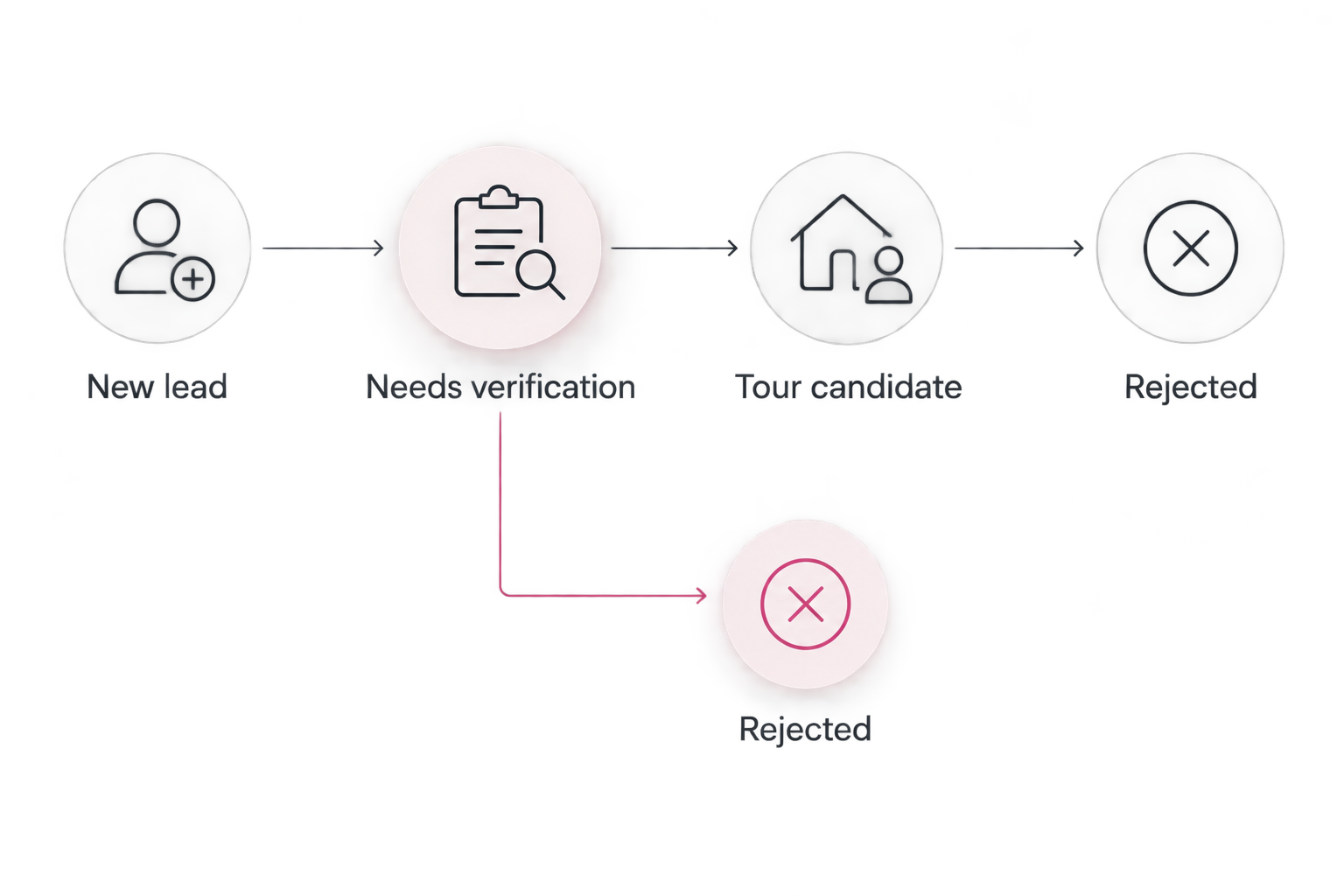
- Assign a status: New lead, Awaiting reply, Needs verification, Tour candidate, or Rejected.
Expected result: You can recover the important details without reopening every message thread.
Use the same tracker for every source. A property found through Marketplace and later discussed with a locator belongs in one row, with both sources recorded—not two competing entries.
| Tracker field | What to record | Why it matters |
|---|---|---|
| Listing identity | Link, property name, stated address | Separates the actual property from the advertisement |
| Contact identity | Poster’s name and claimed role | Establishes who still needs verification |
| Household fit | Layout, pets, accessibility questions | Prevents attractive photos from replacing requirements |
| Commute fit | Destinations and route notes | Keeps location decisions tied to your routine |
| Verification | Contact checked, date, unanswered questions | Shows what remains unresolved |
| Next action | Message, call, tour, or reject | Keeps every lead moving toward a decision |
Do not store identification documents, income records, or banking information in this comparison sheet. The tracker is for apartment research, not an application file.
Give each tool one job
Different tools solve different parts of the search. Use Facebook Marketplace to collect leads, not to certify them. A locator adds personalized research, but a locator conversation does not replace reading the property’s documents yourself.
| Option | Best for | Advantage | Limitation |
|---|---|---|---|
| Facebook Marketplace | Discovering apartment leads | Keeps listing discovery and poster conversations close together | A post alone does not establish leasing authority or accuracy |
| Private spreadsheet or notes | Comparing leads across sources | Preserves your questions, dates, and decisions | Requires manual updates and careful handling of shared access |
| Taco Street Locating apartment locating service | Personalized research and neighborhood guidance | Helps renters compare apartments against their needs | Does not replace your review of lease terms or property requirements |
Verification and tour handoff
Verify the property and contact
- Ask for the exact property address and the specific layout or unit being discussed. Clarify whether the post concerns an entire apartment, a room, or a sublease.
- Ask the poster to identify their role: owner, property employee, agent, current resident, or another intermediary.
- Independently locate the property manager’s contact details. Confirm that the person and proposed arrangement are authorized rather than relying only on a number supplied in the chat.
- For a sublease, ask management what permission and documentation the arrangement requires. Do not assume a resident’s message establishes that permission.
- Record the verification outcome and date in your tracker. Leave unresolved leads marked Needs verification.
Expected result: Each tour candidate has an identifiable property, a clear arrangement, and a contact whose role you have checked.
Keep your 2026 verification notes distinct from the original advertisement. If a manager corrects a detail, preserve the correction and its source rather than silently replacing the earlier claim.
Turn verified leads into a useful shortlist
- Select 3 listings for an initial comparison. This is a practical review size, not a claim that three tours are enough for every renter.
- Share the listing links, addresses, required move timing, household needs, and commute destinations with your locator.
- Label each detail Confirmed or Unconfirmed. Ask specific questions instead of sending an unexplained pile of screenshots.
- Confirm the tour appointment through the verified property contact. Ask whether you will see the specific apartment, a comparable layout, or a model.
Expected result: Your shortlist explains why each property fits and what the tour still needs to resolve.
For personalized help, send Taco Street Locating the research brief rather than your Facebook login. If you are deciding whether that handoff fits your search, the overview of using an apartment locator in Dallas explains the service-based route.
When a listing or your requirements change
The adjacent workflow is an update review: whenever a poster changes the details—or your plans change—recheck the existing row instead of starting another disconnected conversation.
- Mark the affected listing Needs verification again.
- Record what changed and when you noticed it. Keep the earlier note if it explains a previous decision.
- Ask the verified contact whether the change affects your intended arrangement.
- Recheck the listing against your Must have requirements before keeping the tour appointment.
Expected result: A previously promising apartment does not remain on your shortlist simply because you already invested time in it.
A changed employment situation needs a separate check. Understanding how landlords verify income helps you distinguish an application-document request from ordinary listing questions; ask the verified manager which documents and submission method apply before sending anything sensitive.
For a 2026 move based on a new job, explain your employment start date before applying. Keep supporting documents out of casual Marketplace chats and use the property’s verified application process.
Troubleshooting
Marketplace shows listings outside your target area
Reopen the location control and inspect the selected area. Then check individual addresses; broad search results are not proof that a building falls within your preferred neighborhood.
If the results remain too broad, search one neighborhood at a time. Keep your commute requirements unchanged while narrowing the discovery area.
A saved listing disappears
Use the address and contact details already captured in your tracker. Reconfirm the property directly; disappearance alone does not establish what happened to the apartment.
Do not substitute a different apartment mentioned in the same conversation without checking it separately. Give the replacement its own identity and verification notes.
The same photos appear under different addresses
Pause the lead and compare the stated property details. Ask the independently verified manager whether the images and advertisement relate to that property.
Do not send money or sensitive documents while the identity mismatch remains unresolved. Matching decor is not a substitute for a confirmed address and authorized contact.
The poster requests documents before basic verification
Ask for the property identity, the poster’s role, and the official application process first. Verify those details independently before providing personal records.
If the poster refuses basic identification or pressures you to bypass verification, reject the lead. An urgent message does not remove the need for a documented leasing process.
Messages produce answers but no clear next step
Send one focused follow-up covering the unresolved issue: the arrangement, exact property, authorized contact, or tour process. Update the tracker with what is still unanswered.
Set aside a 15-minute review on a schedule that suits you. Use it to close unproductive threads, update statuses, and choose the next action—not to restart the entire search.
Customize your workflow
Adapt the tracker to the household rather than adding every possible amenity column. For pets, record the questions you need management to answer; for remote work, record workspace and connectivity questions; for a relocation, record whether the tour will be remote or in person.
If you begin with an automated apartment-search tool, carry its suggestions into the same verification process before seeking personalized human help. A suggested match is still a lead, not a confirmed leasing arrangement.
For your final 2026 shortlist, add a tour-notes column that separates what you personally observed from what someone described. Taco Street Locating can help with apartment research and neighborhood comparisons, while your notes preserve the details that matter to your decision.
FAQ
How do I connect Facebook Marketplace to my Dallas apartment search?
Save promising listings and copy their links, addresses, contact identities, and unanswered questions into a private tracker. Verify the property and contact before moving a listing to your tour shortlist; this workflow uses a manual handoff, not automatic syncing.
Can I send Facebook Marketplace listings to Taco Street Locating?
Use individual listing links and your search requirements as the starting point for a conversation with Taco Street Locating. Do not share your Facebook password or assume that sending a link verifies the poster’s claims.
What should I do if Facebook Marketplace does not appear?
Use another listing source if Marketplace is not accessible through your account. You can still use the same tracker, verification steps, and tour-shortlist process.
How can I tell whether a Dallas apartment listing is legitimate?
Independently verify the property address, the poster’s role, and the proposed leasing arrangement with the property manager. Photos, profile details, and chat messages alone do not establish authority to lease an apartment.
Should I search all of Dallas–Fort Worth at once?
Start with locations that fit your actual destinations rather than treating Dallas–Fort Worth as one interchangeable search area. Compare exact addresses and routes before widening your boundary.
What should I do when a Marketplace apartment listing changes?
Return the listing to Needs verification and record the change in your tracker. Confirm the revised details through an authorized contact before keeping it on your tour shortlist.
Is saving an apartment listing the same as applying?
No. Saving keeps a listing in your research routine; applying is a separate process with the property or its authorized representative. Verify that process before submitting personal documents.
One last thing
Record what you rejected and why. A Rejected row with a clear reason prevents the same unsuitable apartment from reentering your search through a different post, photo, or contact.
The goal is not a bigger collection of listings. It is a smaller set of apartments whose location, arrangement, and household fit you can explain.
Related guides
- Best apartments in Uptown Dallas
- Best apartments in Bishop Arts District, Dallas
- How long apartment application approval takes in Texas